Thumbnail me 3.0 Multilangual Portable
This post was published 9 years ago. Download links are most likely obsolete. If that's the case, try asking the uploader to re-upload.
File size: 10.3 MB
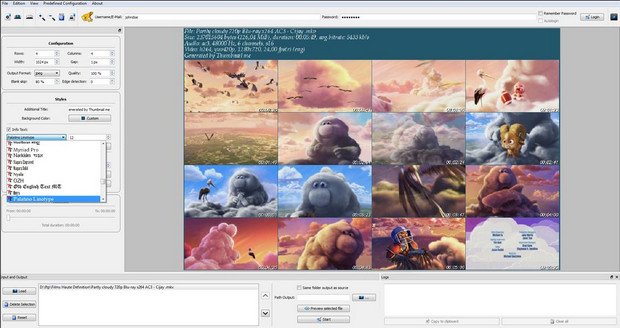
Using this straightforward application you can create an image with thumbnails of your videos, then save it to JPEG, BMP, PNG, or TIFF file format
Thumbnail me works with the following file formats: AVI, MKV, TS, MPG, MP4, MOV, VOB, FLV, SWF, and others. Clips can be uploaded into the working environment using the built-in browse button, so you cannot rely on “drag and drop” operations.
The program comes packed with several parameters designed to help you specify the number of thumbnails to be displayed on each row and column, pick the width and gap, embed a custom title and select the background color, and customize the text in terms of font, size, color, and alignment.
What’s more, you may insert timestamps and add a colored shadow, zoom in or out of the image, specify the saving directory or make the tool export the items to the source folder, and switch to a full screen mode for a better focus on your work.
The generated image can be exported to JPEG, BMP, PNG, or TIFF file format, printed, or copied to the clipboard. For a better management over the entire process, you may also use hotkeys.
Last but not least, you can save the current configuration settings to a file for uploading it in your future projects, check the log for additional information about the entire process, as well as choose between several predefined configuration modes for generating different images.
Features
Videos formats support
Audio/video Interleave (*.avi)
Matroska Video (*.mkv)
Transport Stream (*.ts *.m2ts)
MPEG video/systems stream (*.mpeg *.mpg *.mp4 *.vob *.dat)
Windows Media Video (*.wmv)
Ogg Vorbis (*.ogg)
3rd Generation Partnership Project (*.3gp)
Quicktime Movie (*.mov)
Flash Video (*.flv)
ShockWave Flash (*.swf)
Output formats available
JPEG (Joint Photographic Experts Group)
PNG (Portable Network Graphics)
BMP (Bitmap)
TIFF (Tagged Image File Format)
Upload interface
imageShack upload interface
Authentication/Anonymous upload
Resize your thumbnails
Set privacy and tags name
Release Notes
Migration to Qt 4.8.0.
File Menu updated.
Czech Translation added.
Dutch Translation added.
Homepage
Quick check before we show the links
Helps us keep automated scrapers from hammering the filehosts.