Multi Commander 5.6.1 Build 2011 (x86/x64) Update
This post was published 10 years ago. Download links are most likely obsolete. If that's the case, try asking the uploader to re-upload.
Multi Commander 5.6.1 Build 2011 (x86/x64) Update | 15.3 Mb
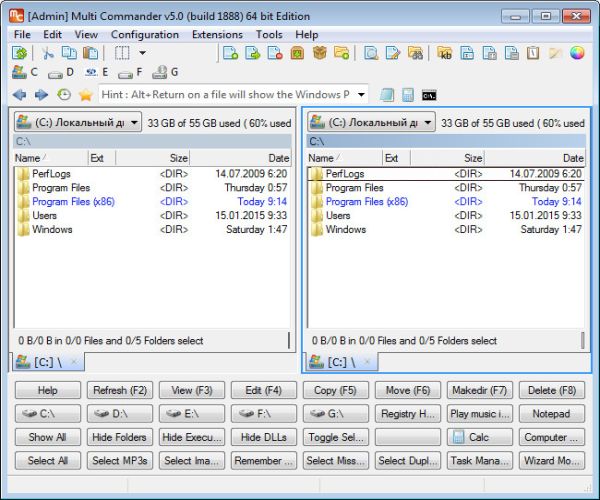
Multi Commander is a multi-tabbed file manager whose purpose is to replace Windows Explorer. Its extensive range of functions and customizable settings should be appreciated by adventurous users who are continuously looking for new ways to speed up file operations.
Multi-tabbed interface with numerous options
The interface is split into two panes where you can open as many tabs as you want, and access different locations on the disk. File operations vary from copying and pasting to more advanced procedures, such as file packing and folder comparison.
You can manage plugins and extensions dedicated to performing advanced file searches, renaming multiple files in batch more, and calculating checkums, among others.
Customize aliases, commands and buttons
It's also possible create aliases for directories to open or applications and insert them into a command-line bar for immediate execution. Moreover, you can personalize a button window that contains various shortcuts, define custom commands (e.g. multi-script, external, batch script), as well as reconfigure keyboard shortcuts for the menu, toolbar, buttons and other areas of Multi Commander.
Versatile file operations
Additional tools of the software application focus on the Clipboard copying method (e.g. file version, comma-separated list), text conversion mode (to Windows, Unix or Mac formats), file security (e.g. take ownership) and file backups, just to name a few.
Furthermore, you can hide folders, executable files and DLLs, select all images from the current location, access the Windows Task Manager straight from the main app window, customize the toolbar and other UI elements (including colors), and much more. Expert settings are up for configuration too, such as the read and write strategy for file operations.
Evaluation and conclusion
The tool worked smoothly in our tests and consumed low CPU and RAM, so it didn't hamper the overall performance of the computer. It includes complete help documentation that clarifies every aspect. Although Multi Commander is not oriented toward beginners, experienced users should be thrilled by the diversity of tools provided by this file manager.
New in version 5.6.1 Build 2011 (17-Okt-2015)
• ADDED - File Operation progress now show progress of queing items for internal plugin operations.
• ADDED - FSFTP will now log data connections errors better.
• ADDED - Menu > Edit > Compare Folders Advanced - Will now show a dialog where it is possible to different compare rules.
• FIXED - Fixad issue when unpacking large zip with duplicated files in archive.
• FIXED - FSZip issue when overwriting existing files
• FIXED - FSFTP now send "AUTH TLS" instead of "AUTH TLS-P" for protected login
• FIXED - SetFolderDateTime tool can cause a crash.
• FIXED - Icon Override Setup is no longer case sensative
• FIXED - MultiFileViewer - RegEx syntax coloring rule chould sometimes cause a crash
OS: Windows XP / XP 64-bit / Vista / Vista 64-bit / 7 / 7 64-bit / 8 / 8 64-bit / 2003 / 2008 R2 / Server 2012 / 10 / 10 64-bit
Download
Uploaded - x86 and x64
Mirror
Rapidgator - x86 and x64
Mirror
Turbobit - x86 and x64
Download From Homepage - x86
Download From Homepage - x64
__ __ __ __ __ __ __ __ __