Mobialia Chess v5.3.5
This post was published 9 years ago. Download links are most likely obsolete. If that's the case, try asking the uploader to re-upload.
Mobialia Chess v5.3.5 | 3.4 MB
Requirements: Android 2.3 +
The best app for chess lovers: Play against AI or online at FICS or ICC.
Play against AI
- Selectable ELO Levels to adjust playing strength, from 500 to 2100, on 50 ELO points steps
- Selectable time per move: changing the ELO and the time per move, lots of difficulty levels can be selected
- Opening book with more than 30.000 positions: ensures variated funny games
- Can undo/redo all moves
- Send PGN by email: This way, you can analyze later your games on your PC
- Graphical setup board, also can edit position’s FEN notation
- On closing, saves the current game and it is loaded when the application is restarted
Play Online
- Play on internet at freechess.org (FICS) or at chessclub.com (ICC)
- Play as guest or as a registered user
- Seek/offer match rated and unrated
- View seeks posted by other users. Can sort seek list by username, rating or game time
- Takeback, draw, abort, resign and rematch options while playing
- Play, Finger and Observe, can also observe LectureBot on FICS or play ProblemBot/TrainingBot on ICC
- Observe current played games in the chess server or follow highest rated games
- Messages: read and send messages to other users
- Game History: you can examine or send by email all your played games
- Console to see server output and to send commands, also for chatting with other users
- Timeseal (FICS) and Timestamp (ICC): avoids lag problems
- Premove option: You can introduce the next movement in your opponent’s turn
- Option to confirm the move before sending it to the server. Forward and Backward buttons are converted on Confirm/Cancel buttons
- Supports wild chess variants: Atomic, Losers, Suicide and Chess960
Chess Problems
- 2900+ chess problems to solve looking for the best moves: problems collected by Uwe Auerswald, from Germany
- Selectable problem difficult (Easy, Medium and Hard Problems)
PGN Browser
- Simple PGN browser, allows you to open PGN files from SD card or from your email
And with the Best Interface
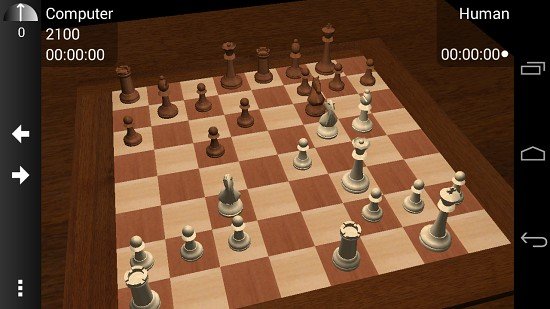
- 2D/3D board
- Clean, simple and intuitive interface (options appear after pressing the “MENU” key)
- Move by dragging and dropping the piece with useful guide lines
- Also move by tapping the origin and the destiny squares or with the trackball
- Portrait and Landscape mode
- Shows legal moves (as yellow traslucid squares)
- Highlights last move (with a yellow arrow or a coloured squarem, can be configured with a settings option), also move hints (as a green arrow) after a request in the menu
- Many piece sets and board styles
- Shows a dot in the side to move and can show board coordinates
- The material gauge indicates the material advantage using this piece values: Pawn=1 Knight=3 Bishop=3 Rook=5 Queen=9. Click on the gauge to show/hide the captured pieces difference
- Shows captured pieces advantage for each one of the sides (as an example if black captured 3 pawns and whites 2, it shows an advantage of 1 white pawn for blacks)
- Speaks moves, checks and game results
- Different sounds for moves, captures and checks, also vibration
- Option to keep the screen on while playing
What's New
– In the new online sidebar, the “Offers” option was showing the user’s finger
– Fixed a bug exporting to PGN in progress games (it was not adding a * at the end of the move list)
– Added the promotion to king option for the suicide/giveaway chess variant
– Fixed some disconnection problems in the web app at
– UCI engines are out of beta
Download Links:
Premium account is Recommended
Download From Nitroflare.com
Premium account is Recommended
Download From Rapidgator.net
Premium account is Recommended
Download From Uploaded.net
Premium account is Recommended
Download From Suprafiles.net