mrViewer v3.8.5 (x86/x64)
This post was published 8 years ago. Download links are most likely obsolete. If that's the case, try asking the uploader to re-upload.
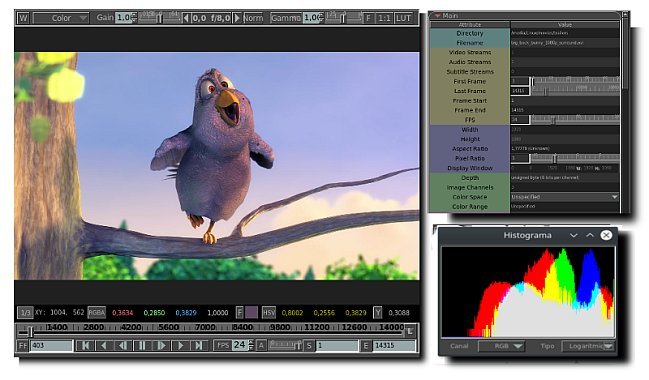
File Size: 75.1 Mb
mrViewer is a compact Windows utility whose purpose is to help users open images and play video files. mrViewer works with the following file formats: BMP, JPG, PNG, PSD, MAP, DPX, MP4, MPG, MOV, AVI, DIVX, WMV, and others.
mrViewer gives users the possibility to add files by simply dragging and dropping them into the primary panel or using the built-in browse button.
What’s more, you are allowed to specify the frame rate, play or stop the current video selection, skip to the start or end position of the clip, adjust the volume, alter the RGB value, and adjust the levels for gamma and exposure.
The application offers support for hotkeys, which can be reassigned, and lets you view a log about the entire process, switch to a full screen mode, make the tool remain on top of other utilities, analyze a histogram, as well as use a pen for editing images.
Last but not least, you can view detailed information about each item, namely filename, size, ratio aspect, gamma, format, memory, compression, creation date, and others.
All in all, mrViewer comes packed with useful features but the GUI is not intuitive and rookies may spend some time trying to configure the dedicated parameters.
FEATURES
• Flipbook player
• HDRI viewer
• Multichannel Support in OpenEXR, PSD and TIFF formats
• MultiView OpenEXR support thru anaglyphs
• Video and Audio player
• Network syncing support
• Non-destructive EDL
• Grease Pencil support
• Multi Part EXR images
• Deep OpenEXR images (Deep Scanline and Deep Tile)
• Animated GIF support
• Color Transformation Language (CTL) Support
• ACES 1.0 Support
What's New in version 3.8.5
• Added tooltips to all OCIO color spaces and to the Config line.
• Allowed changing OCIO config file from the Preference window.
• Added a button to toggle OCIO on and off. By default, it is on.
• Added the environment variable MRV_OCIO_8bits_ICS, MRV_OCIO_16bits_ICS, MRV_OCIO_32bits_ICS, MRV_OCIO_float_ICS to control the default input color space for the corresponding type of image depth.
• For OCIO to perform better, it is recommended you use a 64x64x64 lattice and a num stops of 8. mrViewer will set that to the default when loaded the first time.
• Made the ODT.Academy.RGBmonitor_D60sim_100nits_dim the default ODT for CTL.
OS: Windows All
Homepage
Quick check before we show the links
Helps us keep automated scrapers from hammering the filehosts.