Aml Maple 4.32 Build 650 + Portable
This post was published 9 years ago. Download links are most likely obsolete. If that's the case, try asking the uploader to re-upload.
Aml Maple 4.32 Build 650 + Portable | 3 MB
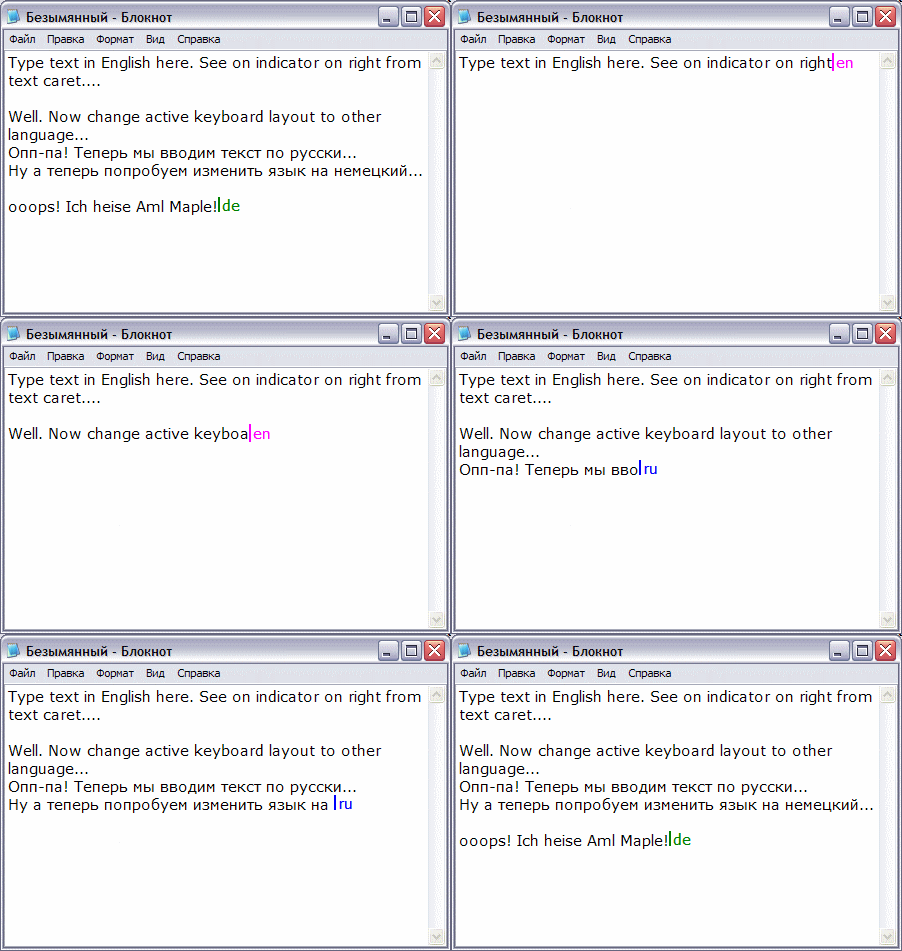
Aml Maple is the language indicator (keyboard layout) showing the input language in a text color and the mouse cursor - ie directly in the place where the typed text. You no longer need to squint your eyes to the monitor angle - the currently selected language will always be in front of your eyes in any application.
Additional Information
Language can be displayed in several ways (together or separately):
The color of the text cursor
Perhaps the most popular way. The text cursor will change its color, depending on the active language. For example, red and blue for English to Russian. Additionally, the cursor may also be displayed, and the language abbreviation (ru, en, uk itd).
The flag in the pointer mouse
The pointer will change its appearance depending on the active language in the window under the mouse cursor. View of the mouse pointer changes only for user interface elements that you can work with the text. For all other elements of the mouse pointer remains unchanged.
The flag in the text cursor
The text cursor appears the country check box for the active language. As soon as you switch the language will change immediately and check.
During Aml Maple icon located in the Windows system tray ( "next to a watch") is turned on is the icon of bright maple leaf, in the off gray icon. The tooltip for the icon you can see all the main settings of the program. To access the settings, right-click on this icon
Password: softarchive.la
Download Links:
Premium account is Recommended
Download From Nitroflare.com
Premium account is Recommended
Download From Rapidgator.net
Premium account is Recommended
Download From Suprafiles.net