Pismo File Mount Audit Package build 181 (Win/Mac/Lnx)
This post was published 10 years ago. Download links are most likely obsolete. If that's the case, try asking the uploader to re-upload.
Pismo File Mount Audit Package build 181 (Win/Mac/Lnx) | 14.3 Mb
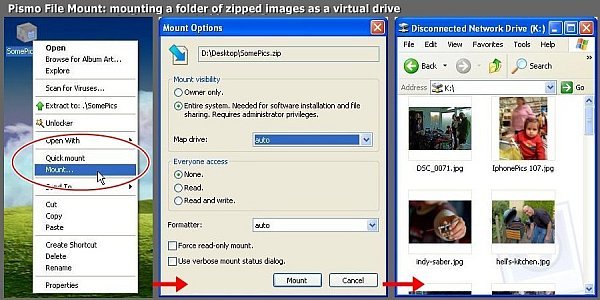
Pismo File Mount Audit Package is a lightweight application that helps users mount file contents to the system as virtual folders, while offering the possibility to mount ZIP archives, CD and DVS images.
It sports a clean and straightforward layout that gives users the possibility to add files to the list by using the “drag and drop” support or built-in browse function.
Basically, it proves to be extremely easy to work with this tool, as you only need to drag the items directly into the primary panel and Pismo File Mount Audit Package automatically creates the virtual folder in the same location as the original items.
Other important features worth mentioning enable users to mount ZIP archives, CD and DVS images, and CFS files, and create private folders which can be used to store sensitive data and applications in an encrypted and compressed container.
Last but not least, you can mount files on local, removable, and network devices and use command-line operations.
Since there aren’t many configuration settings even rookies can master the process with minimum effort.
During our testing we have noticed that the program carries out a task quickly, and without errors throughout the entire process. It doesn’t eat up a lot of CPU and memory, so it doesn’t burden the overall performance of the computer.
To sum it up, Pismo File Mount Audit Package offers a simple but efficient software solution when it comes to mounting file contents to the system as virtual folder. Thanks to its intuitive layout, it is suitable for beginners and professionals alike.
FEATURES
ZIP reader:
Most zip archive files can be mounted as read-only folders to allow access to contents, including the ability to execute contained applications.
CD/DVD image file reader:
DVD and CD images can be mounted in place as a read-only folder to allow access to contents. ISO, CISO, ISZ, and DAA image formats are supported.
Compact File Set reader:
CFS files can be mounted in place as read-only folders to allow access to contents, including the ability to execute contained applications.
Private Folders:
Private Folders can be created and used to store sensitive data files and applications in an encrypted and compressed container file. Private folders are created using a password to generate the encryption key. Once the password is provided at mount time, the protected contents become accessible in place through the file system.
Explorer integration:
Most functionality is available in the shell using context menus and drag-drop operations.
Full file system support:
All built-in Windows file systems and 3rd party file systems are supported. Files on local, removable, and network devices, can be mounted.
Command line interface:
All functionality is available through the command line, allowing scripting and automation.
New in version Build 181 (March 30, 2016)
• Windows and Mac support for local-drive-type mounts. This allos for greater compatibility with WinRT apps on Windows 10.
• New installer GUI for all platforms.
• Add linux kernel compatibility through version 4.5 . Fixed linux
• kernel module compilation issue, causing crash on 4.3 kernels.
• Mac filesystem compatibility enhancements related to folder renames and case-changing renames with carbon APIs.
• Mac and Linux clients report mount "source" in UNC format for improved compatibility with some applications.
• Various minor fixes.
Supported Platforms
• The Pismo File Mount Audit Package supports all versions of Microsoft Windows since Windows XP, both 32 bit and 64 bit.
• The Mac and Linux packages only provide a command line (terminal) user interface, no graphical user interface.