Pixopedia 2014 0.4.1 Portable + Plugins and Manual
This post was published 10 years ago. Download links are most likely obsolete. If that's the case, try asking the uploader to re-upload.
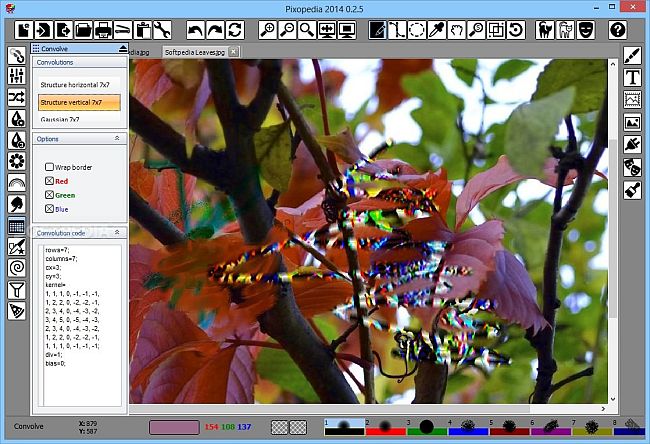
Pixopedia 2014 0.4.1 Portable + Plugins and Manual | 26.6/10.1 Mb
Most people use image editors to retouch their photos or create simple designs for their documents, emails or web pages. Therefore, most image editors share a number of commonly used features such as red-eye removal and contrast or hue controls. This means that there's often not much to discover when it comes to using such software.
Users might find Pixopedia to be a bit different in this respect.
Easily configurable brushes
Other applications also feature configurable brushes. This one, however, stands out from the rest because of the variety of settings the user has access to.
There are a some of presets, including textured brushes available, but the number of controls and customization options leaves a lot of room for experimentation.
A multitude of effects and filters
The left panel of the main window features a large number of filter and effect categories, ranging from common ones such as blur or sharpen to more curious examples, such as Highpass, Dilate and Top Hat. These, like the brushes, can be thoroughly customized and users can apply them either through the above-mentioned brushes or to selected areas of the image in order to create various results.
Further customization using plugins and scripts
For those who want to delve deeper into image editing and automation using Pixopedia, the application supports both third-party plugins or LUA scripts and comes with small collection of examples to help users get started.
An image editor for those who like to experiment
Pixopedia is a surprisingly well featured image editor that supports a number of tools one would come to expect of such a piece of software, and some that seem to be a bit more exotic. However, while using it to experiment with its various filters, brushes, effects and their options and settings can be very entertaining, putting this application to more serious uses may be a bit daunting because of its cumbersome and sometimes unintuitive interface.
FEATURES
• Every brush has it's own settings, color, texture, background tile and other parameters.
• Tools, actions, brush parameters are created as sticky forms. Forms can be detached and moved freely. This is useful when working with extended desktop with two monitors.
• New drawing engine implemented: every shape border is drawn with current brush. Interior drawing of closed shapes uses it's own parameters.
• New undo buffer engine: single stroke undo/redo, multiple strokes undo/redo (ornaments). Every layer has it's own undo buffer.
New in version 2014 0.4.1 (October 28, 2015)
• Lattice type selection for CML brush (ommited by mistake in previous version) has been added:
- Uncoupled
- Coupled simple
- Coupled NzN
• Check box “Destruction On” removed as obsolete. To exclude destruction, simply set D prob. slider to zero.
• User can select four functions separately for grow and destruction/decay by clicking on appropriate sky-blue colored rectangle:
- L – linear intensity change
- Q – quadratic change
- Nb – “neighbor bullying”
- Ni – inverse “neighbor bullying”
• Weight parameter added (visible for coupled lattice types).
Pixopedia 2014 plugins
All plugins listed in this secion can be used only with Pixopedia 2014 version 0.2.4 and up. After downloading plug-in, unpack it, select directory where Pixopedia 2014 is installed and copy desired ppi plug-in in pixplugins subdirectory. All Pixopedia 2014 plug-ins have extension ppi.
• Image Infector v2.0 – various image effects using cellular automata concept
• Dislocator v1.0 – various image effects using kernel remapping, local gradient warping and grid slicing algorithms
SYSTEM REQUIREMENTS
• CPU: Pentium IV and upward.
• Memory: minimum 1GB.
• Screen resolution: minimum 1280 x 1024
OS: Windows XP / Vista / 7 / 8
Download
Uploaded - Portable
Uploaded - Plugins and Manual
Mirror
Rapidgator - Portable
Rapidgator - Plugins and Manual
Mirror
Turbobit - Portable
Turbobit - Plugins and Manual
---
__ __ __ __ __ __ __ __ __