Subsurface 4.5.1 + User Manual
This post was published 10 years ago. Download links are most likely obsolete. If that's the case, try asking the uploader to re-upload.
Subsurface 4.5.1 + User Manual | 83.3 Mb
The world beyond your desktop monitor stretches far and wide, with an unimaginable number of activities you can perform. Since “going out” is slowly becoming a rare activity, there's a high chance you want to record it, be it with pictures or a log. Dedicated to an activity for which you need heavy training, Subsurface lets you record all of your diving sessions in a fun and practical environment.
Add data from various sources
In case you already have a solid record of diving sessions, you need to know that the application comes with impressive support for importing data. Besides the amount of file formats you can import, such as CAN, CSV, DLD, JLB, LVD, SDE, DLF, UDDF, UDCF, XML and APD, you can use the dedicated web service for GPS data, or even better, directly from your dive computer.
On the other hand, you're free to start with a blank page and manually add data. The overall process is incredibly easy, although there are a decent amount of fields and requirements you need to go through. Helping you out is the highly-intuitive design, fitted with polished graphs, real time updates, animated transitions, as well as a built-in world map to pick the exact point of your activity.
Specify location, equipment info and add photos
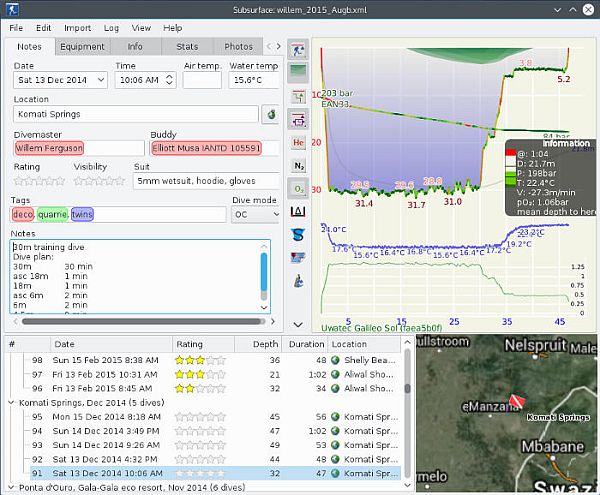
Areas you go through are kept in tabs, with options like dive notes, equipment, dive info, stats, photos and extra data. As you add info, a graph gets updated with details that are crucial to consider once you go underwater, such as oxygen level, heart, EAD, END and EADD rates. These can also be modified on the graph itself by dragging specific points.
Initial details let you add time and date settings, air and water temperature, location, coordinates, the type of dive you performed, additional notes and more. The built-in map greatly comes in handy for specifying location, especially for the coordinates field. If you're using the log for specialized dive sessions you can add equipment info, such as type, size and pressure values, or attach photos of your experience.
Saving benefits from a decent amount of supported formats, making it compatible with other applications of it's type, as well as general purpose files. The export option lets you carefully define what and how you want to save, set measurement units to use, font, general details and number of dives.
To sum it up
All things considered, we can safely state that Subsurface is an application you need to have around if diving is amongst your favorite outdoor activities. Data import options let you add from various sources, even external dedicated devices. The intuitive and polished design makes sure you quickly and easily add all data you need, while export options wrap your project in a package that suits your needs.
New in version 4.5.1 (October 27, 2015)
• Several errors in translations were fixed, one of which could cause a crash when running Subsurface in German and using the dive planner
• Many translations have been improved, especially the Hebrew translation has made a huge leap forward and is now complete
• Two issues related to our integration with divelogs.de were addressed: uploads now work from Windows and uploads from all platforms now correctly recreate location / site information if that information had previously been downloaded from divelogs.de
• We fixed a problem that caused a situation where in some environments users weren’t able to edit the print templates
• The Suunto EON Steel is now supported on Mac
• Tank sizes set on the Suunto EON Steel are now downloaded and added on the equipment tab of the dive
• Further support for free divers
• Several algorithmic improvements leading to better profiles, better SAC rate visualization, and better detection of the time offset when matching pictures to dives
• We fix several UI issues
OS: Windows XP / XP 64-bit / 7 / 7 64-bit / 8 / 8 64-bit / 10 / 10 64-bit