ConfigFox v1.4 (x86/x64) Portable
This post was published 10 years ago. Download links are most likely obsolete. If that's the case, try asking the uploader to re-upload.
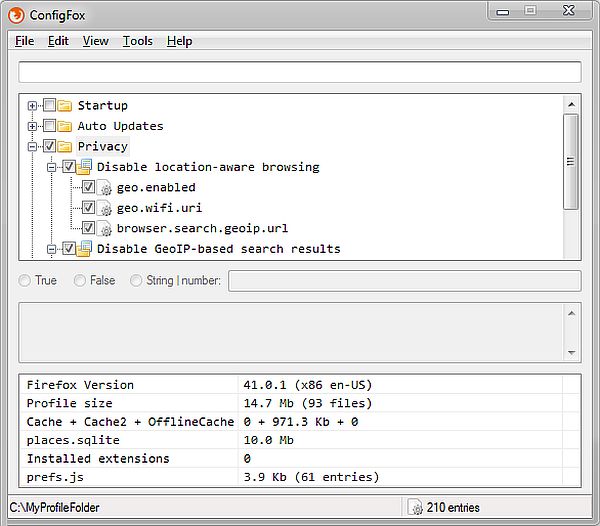
ConfigFox v1.4 (x86/x64) Portable | 5.0 Mb
ConfigFox is an utility to manage Firefox advanced, hidden settings and tweaks, mostly concerning security and privacy. With a single click you can turn on/off settings that are not offered in the Firefox preferences. The program includes search, can create profiles, manages settings as on/off checkboxes, and more. Also includes vacuum (clean the database to reduce file size), defrag, backup, and online string search tools.
Portable app for tweaking Firefox
ConfigFox is a nifty application that brings the browser’s settings out in the open, making them easier to understand and to modify.
Since it is a portable utility, you do not need to waste time to install it on your PC - it runs directly out-of-the-box, and it can even be carried on removable drives. Moreover, it can process user profiles from both standard and portable editions of Firefox (if you use the portable edition, simply browse to the profiles location and load it within the app).
Its interface is meant to be as intuitive as it can be, and all the available settings are sorted in groups.
Alter startup behavior, privacy and cache settings
You can rely on ConfigFox when you want to disable startup checks, skip the verification of the browser’s current milestone or to empty the welcome page URL.
The privacy settings can be improved by disabling cookies on all sites, clearing history when Firefox is closed, disabling telemetry or crash reports. The add-on usage reporting or the GeoIP-based search results can also be deactivated.
You can also disable automatic updates for the browser or the installed add-ons, as well as disable disk and offline cache or the storing of extra session data.
Tweak JavaScript, SSL, encryption and other settings
There are other enhancements you can bring to your Firefox, such as disabling JavaScript meddling, DOM storage, script capabilities, along with battery, gamepad or network APIs.
You can set ‘do not track’ HTTP header, block rc4 fallback, override rc4 ciphers, enable OCSP stapling or display warnings for ‘broken security’.
All in all, there is a wide range of configuration settings that can be modified using ConfigFox and it is up to you to discover them all. Still, it is best to create a backup profile and only then experiment with these values, especially if you are not sure about their consequences.
New in version 1.4 (October 26, 2015)
• New: Users now can select a custom Firefox executable (Portable, Palemoon, Waterfox, ...) if Firefox is not installed or not found.
• New: Tools > Apply dummy files (current profile)
• New: Tools > Run Firefox Profile Manager.
• New: Help > Check for new version.
• New: Help > Donate.
• New: Entries that are in user.js but not in ConfigFox collection (default.js) are highlighted.
• Changed: ConfigFox collection (default.js) will only contain entries that cannot be set from Firefox itself.
• Changed: ConfigFox collection (default.js) groups were reorganized (layout/format stills the same).
• Changed: Window width is narrower.
• Fixed: Search box no longer have to be focused to navigate through search results (PgUp|PgDown).
• Fixed: Improved search code. (Minor window blinks on PgUp|PgDown)
• Fixed: Renaming an item in the tree view did not work sometimes. Fixed consistency.
• Fixed: Case sensitive awareness for configuration strings (bug when renaming upper/lower case).
• Fixed: Message "Profile folder does not exists" if the profile folder was hidden.
• Fixed: URL for collection (default.js) updates now points to the master link.
• Fixed: Version number was not informed on Help / About.
• Minor bug fixes and code optimizations.
SYSTEM REQUIREMENTS
• FIREFOX
OS: WinXP / Vista / Win7 / Win8 / Win10 (32 / 64 Bit)